As experienced classroom teachers, we know how giving students a choice in their learning experiences can motivate them. We’ve seen students get excited when they can choose what they’d like to read, instead of being given another packet of text. Even something as simple as allowing students to pick which problems they want to do on a math worksheet, instead of doing all the problems, increases their willingness to complete the work. When students are motivated, they learn more!
However, allowing students this freedom can create anxiety in teachers. It took me a long time to learn that I can give students freedom within my own comfort level, creating an environment we all want to work in.
Our goal is to reach all learners and provide students with experiences within their readiness level and interests. Lev Vygotsky’s “Zone of Proximal Development” theorizes that students need to be appropriately challenged. Allowing students to make choices in their learning, with a nudge from their teacher, creates an enjoyable, safe learning experience.
Remember: Choice works best when it is intentional. Teachers must create the optimal environment for student choice. Student choice, but with purpose.
Leveraging Technology in Student Choice
With more schools becoming 1:1, where each student has their own device, we can leverage technology to give students choice in their learning. There isn’t just one way to use technology in your classroom, but we should utilize it meaningfully. Simply listing apps or websites for students to use after finishing their work isn’t the best use of their time. We need to harness technology to enable students to demonstrate their learning. One of my favorite tools for this is a HyperDoc.
What is a HyperDoc?
According to Hyperdocs.co, “HyperDocs, a transformative, interactive Google Doc replacing the worksheet method of delivering instruction, is the ultimate change agent in the blended learning classroom.”
HyperDocs were created by The HyperDoc Girls – Lisa Highfill, Kelly Hilton, and Sarah Landis. They sought to use technology to personalize learning experiences. One of my favorite quotes from them is, “It’s not about teaching technology, it’s about using the technology to TEACH.”
Visit their website for an in-depth look at HyperDocs and examples from other teachers. They provide a space called Teachers Give Teachers to share and use HyperDocs. You won’t be disappointed!
How do HyperDocs fit into the classroom?
HyperDocs provide a student-centered learning experience. At first glance, they may look like Google Docs with a bunch of links, but each link is intentional, creating quality inquiry-based learning opportunities. We ask students to engage with the information they are learning actively.
HyperDocs fit well into a blended learning platform. The format allows for variety and flexibility:
- Whole-group instruction when needed
- High-tech or low-/no-tech activities
- Independent, self-paced learning
- Small-group instruction
Using a HyperDoc helps free up time for teachers to work with small groups or individuals while others work at their own pace.
Explore, Explain, Apply
HyperDocs were created based on many research and learning theories, including Eric Mazur and Ramsey Musallam’s work with Cycles of Learning, inspired by Robert Karplus’s cycle Explore, Explain, Apply. This format is easy for anyone to use!
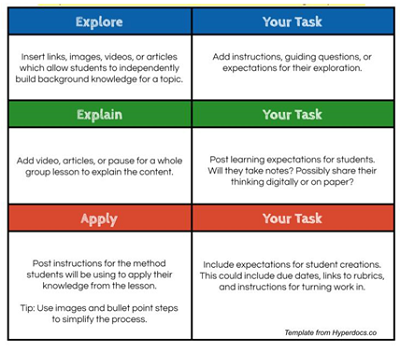
Quick Step-by-Step Guide
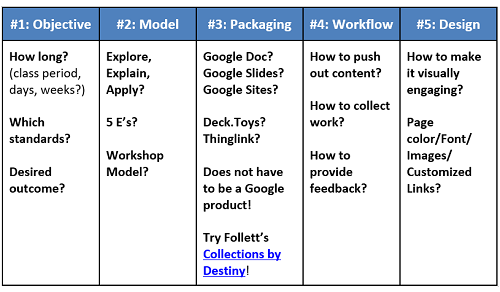
Other Resources: Do a quick Google search, and you’ll find many ready-made HyperDocs. However, ensure they fit your needs. Sometimes, creating your own is best.
Be sure to check out The HyperDocs Girls’ book, The HyperDoc Handbook: Digital Lesson Design Using Google Apps.
Twitter:
- #Hyperdocs
- @lhighfill
- @kellyihilton
- @sarahlandis
Check out these examples of HyperDoc samples:
- Fantasy Book Clubs for 4th Grade
- Fish in a Tree Class Read Aloud
- The Highway Man HyperDoc
- #TheBookChat HyperDoc for High School
Check out Collections by Destiny
This tool, part of Follett Destiny® Library Manager, allows you to create collections of resources for students, parents, administration, or other teachers. You can even create playlists to organize your resources intentionally.

Stacia Dirks
Stacia has worked in education for nearly 20 years in diverse K-5 classroom settings, as a classroom teacher, an instructional coach, and now as an instructional technology specialist for K-12. She holds a Master’s Degree in Differentiated Instruction from Concordia University. Her passion is providing equity for all students and embedding technology into curriculum to enhance 21st-century skills for students. She provides differentiated professional development to K-12 teachers for successful integration of technology with all content areas and structured curriculum. Twitter: @staciadirks
Empowering Student Choice with HyperDocs
Blogs
July 14, 2021

Building Educator Capacity Through Collaboration
Case Studies
February 17, 2021

District Solves Textbook Inventory Challenges with Follett Software, Saving Time and Money
Case Studies
March 10, 2020

eBooks and Digital Devices: A Formula for Literacy Success
Case Studies
January 23, 2020

District Upgrades from Outdated Tracking Process With Follett Software
Case Studies
January 23, 2020

Digital Citizenship Transforms School Library into a Cutting-Edge Environment
Case Studies
January 23, 2020

Curating Content in One Place: Transforming Curriculum Development for Educators
Case Studies
January 23, 2020